How to Debug a Response Formatting Bug Before It Fails Your APIs
Have you ever encountered a recurring issue where your API client failed with the error java.util.zip.ZipException: Not in GZIP format, immediately after receiving a successful response from the server? The request itself completed without error, and the server returned a valid success status. However, when the client attempted to decompress the response body, it failed.
This failure occurred only under one specific condition: when a particular feature used to track and log response timing was enabled. When this feature was disabled, the same request, with the same data, completed successfully every time.
This inconsistency indicated that the issue was not caused by the application logic itself, but by how the response was being modified as it passed through the system.
Understanding the Architecture
Before diving into the HTTP protocol details, let's identify the components involved in the request path.
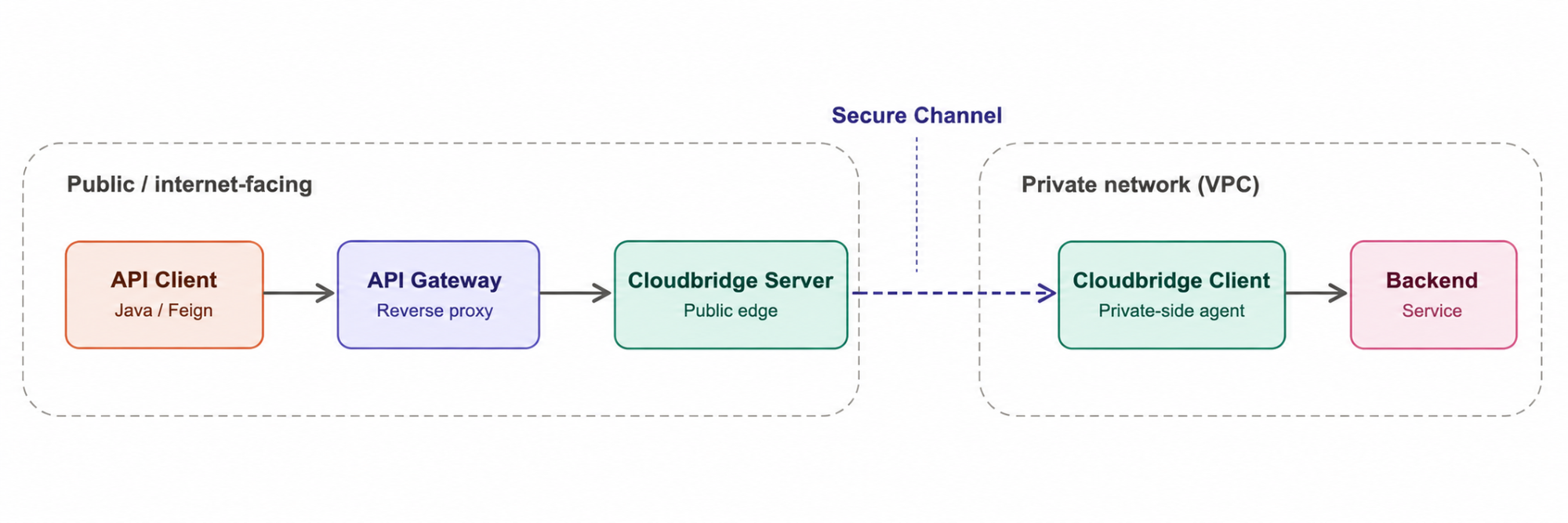
- API Client (Java / Feign): Sends the HTTP request and decompresses responses marked with Content-Encoding: gzip.
- API Gateway (Reverse Proxy): Routes requests and forwards responses between the client and Cloudbridge.
- Cloudbridge Server (Public Edge): Relays requests and responses between the gateway and the secure channel.
- Cloudbridge Client (Private Network): Forwards requests to the backend and relays responses through the tunnel.
- Backend Service: Processes the request and returns the HTTP response, often compressed with gzip.
Five hops. Any one of them could have been the issue, but only when 'TTFB propagation' feature was on. That narrowed things considerably.
Background: Two Layers of HTTP Encoding
HTTP/1.1 responses use two distinct layers: transfer framing and payload encoding. Confusing these layers is a common source of proxy and gateway bugs.
| Layer | Question It Answers | Example Header |
|---|---|---|
| Transfer Framing | How does the receiver determine where the message body begins and ends on the wire? | Content-Length or Transfer-Encoding: chunked |
| Content Coding | How has the payload itself been transformed? | Content-Encoding: gzip |
HTTP splits headers into two categories:
End-to-end headers are part of the message itself. They're meant to survive untouched from the originating server all the way to the final client — Content-Type and Content-Encoding are both end-to-end.
Hop-by-hop headers describe the connection between one pair of hops, not the message as a whole. Each intermediary is expected to consume them and, if it forwards a body, regenerate its own version for the next hop. Transfer-Encoding and Connection are the classic examples.
Clients must always process these layers in a strict order:

The Problem and the Proof
During a production investigation, we observed that a Java client repeatedly failed with ZipException: Not in GZIP format despite receiving a successful 201 Created response. A raw wire capture (representational) at the API Client revealed the following response:
HTTP/1.1 201 Created
Content-Type: application/json
Content-Length: 177
Content-Encoding: gzip

a6\r\n               <-- HTTP chunk size (166 bytes)
1f 8b 08 ...         <-- Gzip stream begins here
...\r\n
0\r\n
\r\n
At first glance, the response looked valid: it returned a successful status, declared Content-Encoding: gzip, and included a Content-Length. The problem was hidden in the first bytes of the response body.
Because Transfer-Encoding: chunked was absent, the client treated the body as a fixed-length gzip entity. It read the bytes indicated by Content-Length and passed them directly to GZIPInputStream. Instead of encountering the gzip header (1f 8b), the decoder saw the chunk-size line (a6\r\n) and threw ZipException: Not in GZIP format.
Byte Accounting (The Mismatch)
- Decoded gzip payload: 166 bytes (0xa6), beginning with 1f 8b.
- Chunk-framed response: 177 bytes on the wire, beginning with a6\r\n.
The response headers described a fixed-length gzip entity, but the body still contained HTTP chunk framing.
This inconsistent state appeared only when TTFB(Time To First Byte) propagation was enabled. The header-reconstruction path removed Transfer-Encoding: chunked while leaving the chunk-framed body unchanged, resulting in an invalid HTTP response.
Understanding the Gzip Magic Bytes
Every valid gzip stream begins with a fixed 10-byte header. The first two bytes are the gzip magic number: 0x1f and 0x8b.
00000000  1f 8b 08 00 ...
         ^^^^^
         Gzip Magic
GZIPInputStream validates that these bytes appear at the start of the stream before attempting decompression. In our response, however, the stream began with the HTTP chunk-size line (a6\r\n) instead of the gzip header (1f 8b). As a result, the decoder treated the response as an invalid gzip stream and threw ZipException: Not in GZIP format.
Comparing the Three Execution Paths
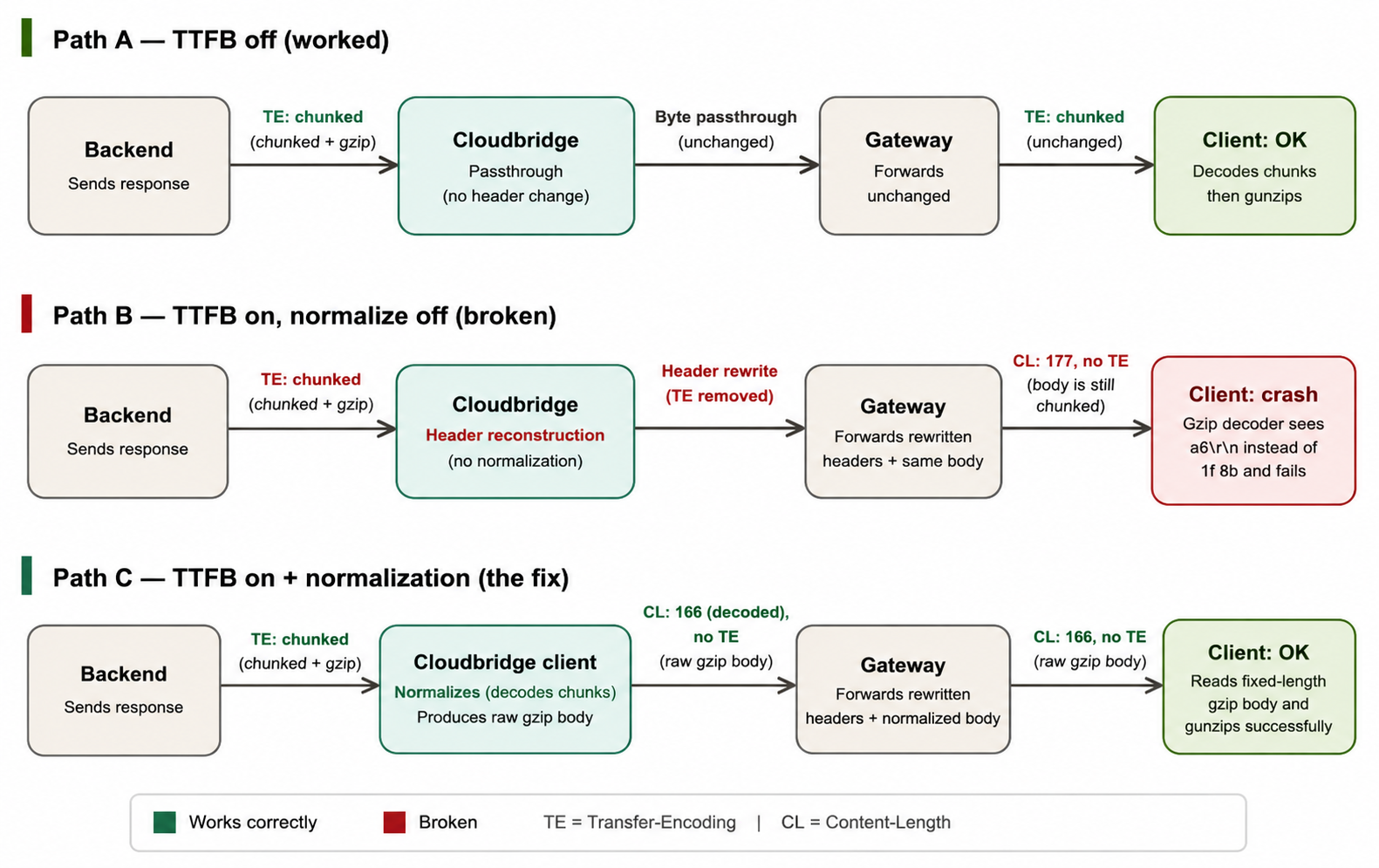
The diagram below compares three execution paths for the same request. Path A shows the normal passthrough flow, where the response remains correctly framed and the client succeeds. Path B shows the failure scenario, where header reconstruction occurs without first removing the chunked transfer framing, resulting in an invalid response. Path C shows the fix, where the Cloudbridge Client normalizes the chunked response before the headers are rebuilt, allowing the client to process the response successfully.
The Fix: Chunked Normalization
The long-term fix was to perform Chunked Normalization at the earliest point where the response is visible: the Cloudbridge Client.
When the Cloudbridge Client receives a response with Transfer-Encoding: chunked, it decodes the chunked transfer framing before rebuilding the response headers and relaying the response through the channel.
The normalization process consists of four steps:
- Detect and Decode Chunked Responses If Transfer-Encoding: chunked is present, decode the chunked response into its original payload.
- Remove Transfer Framing Headers Remove the Transfer-Encoding header, as the response is no longer chunked.
- Generate a Correct Content-Length Calculate the size of the decoded payload and set the Content-Length header accordingly.
- Relay the Normalized Response Forward the decoded payload (beginning with 1f 8b) together with the updated headers, ensuring downstream components receive a correctly framed HTTP response.
Trade-offs: The Cost of Normalization
Chunked Normalization improves framing correctness but introduces a small, well-understood cost. Like any protocol transformation, it involves trade-offs that are worth understanding.
| Area | Impact |
|---|---|
| CPU | Minimal. Decoding chunked transfer framing is a lightweight, linear-time operation. |
| Memory | The decoded payload must be buffered before a correct Content-Length can be generated. For typical API responses, this overhead is negligible. Implementations should enforce a bounded buffer (for example, 64 MiB) to avoid unbounded memory usage. |
| Latency | Because the entire chunked body must be read before relaying begins, this fix trades immediate streaming for framing correctness; the response can no longer be forwarded chunk-by-chunk as it arrives. For small API payloads, this added latency is effectively unmeasurable. For very large or slow-streaming backend responses, it's worth monitoring. |
| Failure handling | If chunk decoding fails, the safest fallback is to preserve the original response exactly as received, including its transfer framing, while emitting a warning for diagnostics. This avoids introducing new framing inconsistencies during error handling. |
For the small API responses involved in this incident (well under 1 KB), the additional buffering cost is effectively negligible. Systems handling large or long-lived streaming responses should benchmark the memory and latency impact before enabling normalization by default.
Concrete Debugging Checklist
When diagnosing transport-layer failures such as ZipException: Not in GZIP format, use the following checklist alongside the debugging flowchart.
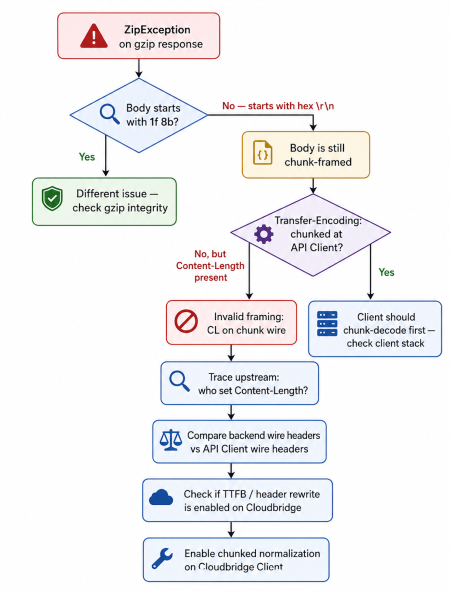
Checklist for diagnosing transport-layer failures:
- Capture the backend response.
- Verify the backend framing (Transfer-Encoding: chunked and no Content-Length).
- Inspect the API Client wire capture.
- Starts with 1f 8b → valid gzip payload.
- Starts with hex\r\n (for example, a6\r\n) → chunk framing is still present.
- Verify configuration, including TTFB propagation and Chunked Normalization.
- Confirm normalization occurred, ensuring:
- the chunked response was decoded,
- Transfer-Encoding was removed,
- a new Content-Length was generated.
- Review logs for TTFB propagation and normalization events.
A Critical Debugging Trap
One of the most misleading aspects of this investigation was relying on high-level HTTP abstractions instead of the raw protocol.
Libraries such as Go's http.ReadResponse normalize HTTP semantics. For example, Transfer-Encoding is represented internally rather than exposed as a regular response header, so application logs may not reflect the bytes that were actually transmitted on the wire.
As a result, parsed HTTP objects can disagree with the raw network traffic.
When debugging proxies, gateways, or HTTP tunnels, always verify the raw wire capture before drawing conclusions. The network bytes, not the parsed HTTP objects, are the definitive source of truth.
Engineering Takeaways
This investigation reinforced several principles that apply to any HTTP proxy, API gateway, or tunneling system.
- Keep Transfer Framing and Content Encoding Separate: Transfer framing describes how a response is transported, while content encoding describes the payload itself. Mixing the two results in invalid HTTP responses, even if both layers are individually correct.
- A Successful HTTP Status Does Not Guarantee a Valid Response: A 200 OK or 201 Created only confirms that the request was processed. Always verify that the response headers accurately describe the bytes on the wire.
- Header Rewriting Must Preserve Framing Semantics: Any component that rebuilds HTTP headers must preserve or correctly regenerate the associated framing. Header transformations should never leave the payload in an inconsistent state.
- High-Level HTTP Libraries Hide Protocol Details: Parsed HTTP objects are designed for application development, not protocol debugging. When investigating transport issues, trust the raw wire capture over convenience APIs.
- Protocol Features Require Transport-Level Regression Tests: Features that modify HTTP headers should be validated using raw wire captures, not just functional tests. Correct application behavior does not guarantee correct protocol behavior.
- Know End-to-End and Hop-by-Hop Headers: Every proxy, gateway, and load balancer in the path needs to correctly relay end-to-end headers untouched, while consuming and properly regenerating hop-by-hop ones like Transfer-Encoding. A hop-by-hop header can legitimately change between hops, but only if the component making that change also re-frames the body to match, dropping the header without finishing the re-framing is what turned a valid transformation into an invalid response.
The end-to-end request and response flow, including the normalization step, is shown below for reference.
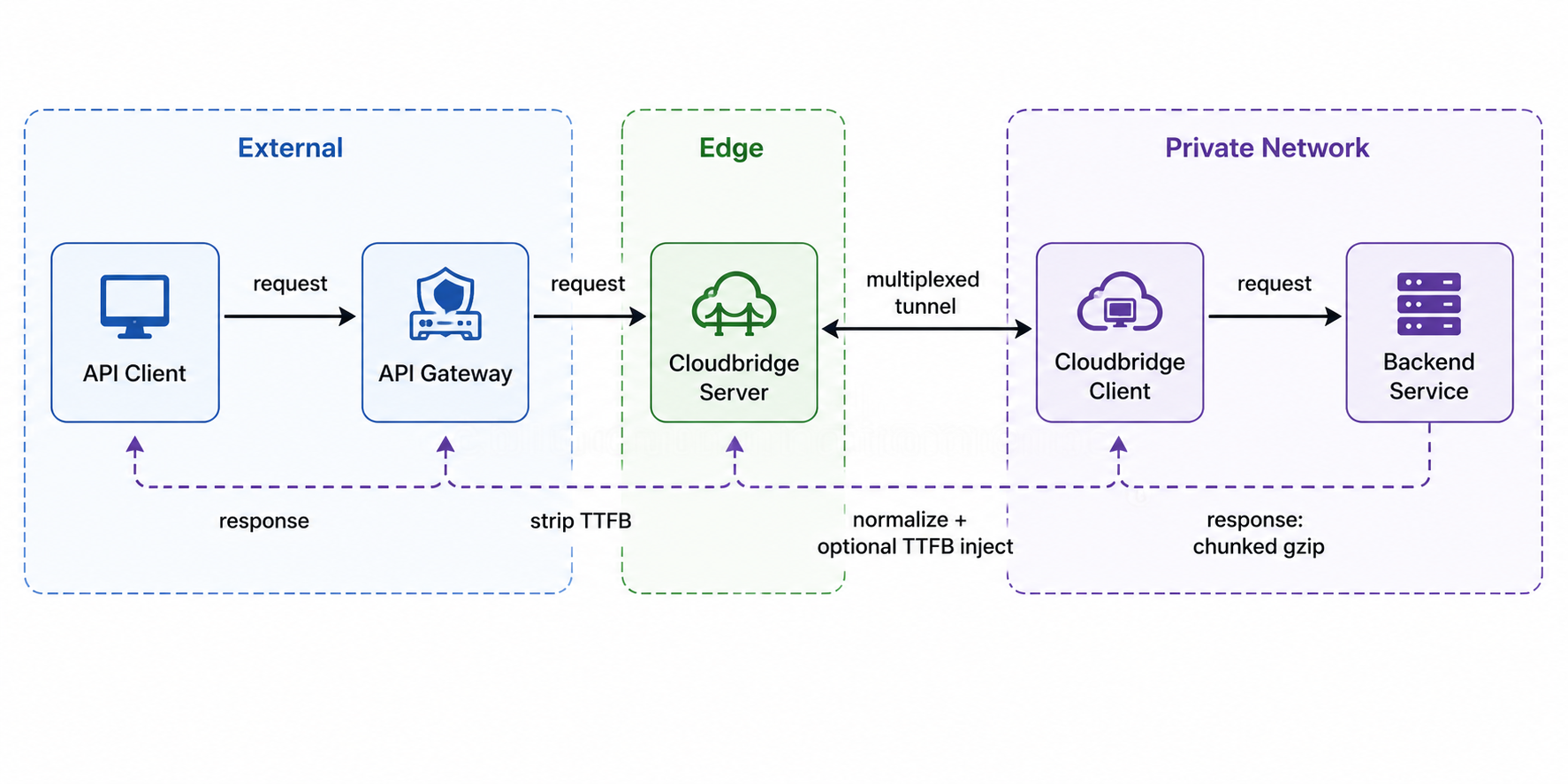
Interested in the architecture behind Cloudbridge? Explore the complete engineering deep dive here.
If you enjoy practical engineering case studies, architecture deep dives, and real-world lessons from the teams building distributed systems at scale, subscribe to engineering.acceldata.io and receive our latest articles every week.