Accelerating Technical Documentation with AI: Guardrailed, Code-Tested & Self-Improving
Documentation was one of the first areas targeted for AI automation, since it is structured, repeatable work with a well-defined output. However, a human reviewer remained necessary at every step, largely due to hallucination and inconsistent output quality.
To advance past this limitation, Acceldata built Docs Agent, an AI assistant that generates product documentation directly from your application and codebase. You specify what needs to be documented, and the system returns a complete, publish ready guide. Our own product, xDP, runs its documentation pipeline (the /xdp-docs command) on Docs Agent, and the same architecture extends to any product. This blog details the underlying implementation and how an engineering team can adopt it.
This agent acts like a seasoned technical writer with access to your live product UI and your codebase. It logs into your product, reads through your code, and writes a clean, ready-to-publish user guide in minutes. For added confidence, a human-in-the-loop can review every guide, and test or redraft it using the available assets with a single click, before it ever reaches a customer.
Documentation teams have long faced a structural problem: when a change shipped without a corresponding Jira ticket, the writing team often had no way of knowing it happened until a customer noticed first. Docs Agent which compares the documentation everytime with the code base, addresses this at the source, rather than trying to patch the reporting gap. By combining a disciplined architecture (read more on how we approach this), direct access to the product UI, a defined set of guardrails, curated media, established style guides, and continuous testing against the live codebase, and by retaining context across every writing run, the system closes the gap that used to depend on someone remembering to raise a ticket. This knowledge compounds: each run feeds back into the product architecture notes, so the agent starts every new guide a little more accurate and a little better informed than the one before it. Taken together, these constraints have shaped the agent into something closer to a well-coordinated documentation team than a single automated writer.
Before going further, it helps to define a few terms used throughout this blog.
Terms to Familiarise
| Term | Context |
|---|---|
| Agent | The AI assistant (running inside Cursor or Claude Code) that does the work. |
| Cursor / Claude Code | The coding tools the AI assistant lives in. Think "chat window that can also click around and read files." |
Command (/xdp-docs) |
A saved instruction set the assistant runs on demand — here, "write documentation." You start it by typing /xdp-docs in Cursor or Claude Code. |
| Browser MCP (Playwright) | A plug-in that lets the assistant actually open your product in a browser and click through it, like a person would. |
| DeveloperHub | The public hosting platform where the finished user guides are published for customers to read. While replicating this for your organization, you can plug in the agent to any hosting platform as you prefer. |
| Persona | The type of reader a guide is written for (Eg: a data engineer vs an administrator), so the tone and detail fit. |
Markdown (.md) |
A simple text format for documents. Both the notes the assistant reads and the guide it writes are Markdown. |
| Slug | The short name in a page's web address, e.g. spark-job-create. |
Operational Architecture
Docs Agent allows you to describe what needs to be documented. It then gathers the facts from your live product and codebase, writes a first draft, and returns it to you for review. Once approved, the guide gets published. Here's the whole flow:
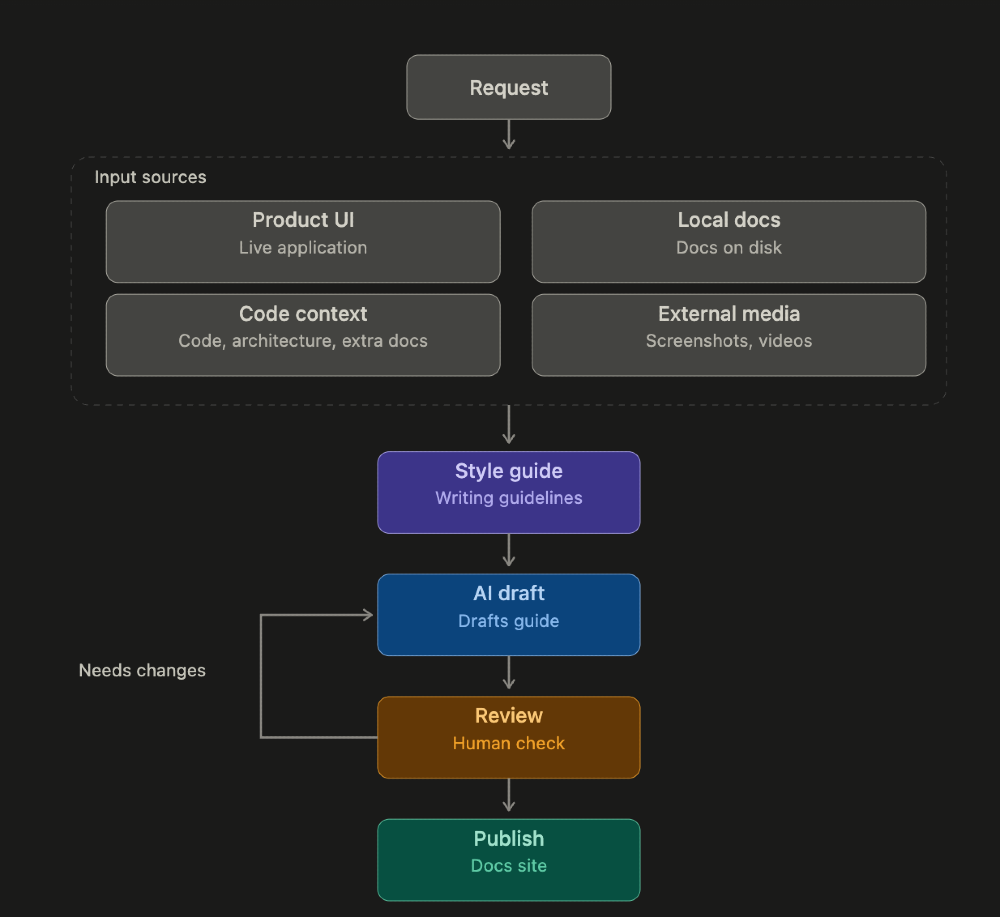
Modes Available in Docs Agent
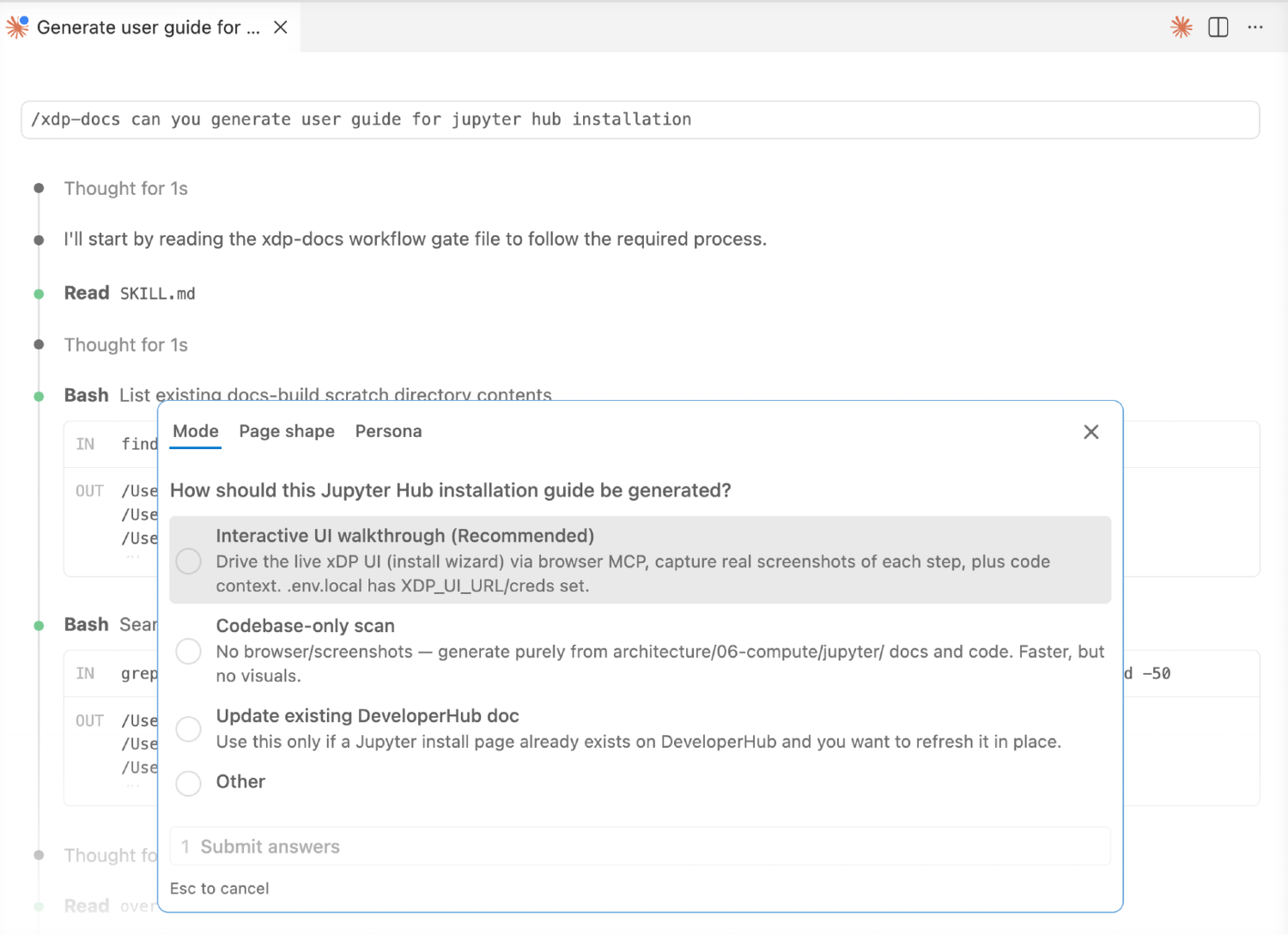
Before it starts writing, the assistant asks which mode you want to run:
| Mode | What Happens.. | Good for.. | Needs the Browser? |
|---|---|---|---|
| 1. Walk the live product | The assistant opens your product, clicks through a feature, and screenshots each step | Step-by-step tutorials with pictures | Yes |
| 2. Read the code only | No product: it reads your codebase and notes, and explains how something works | Concept / "how it works" pages | No |
| 3. Refresh an existing page | Reads a page that's already published and updates the parts that changed | Keeping docs current | Optional |
| 4. Reuse what's already captured | Screenshots/video already exist: skip the browser and just write | Fast re-runs | No |
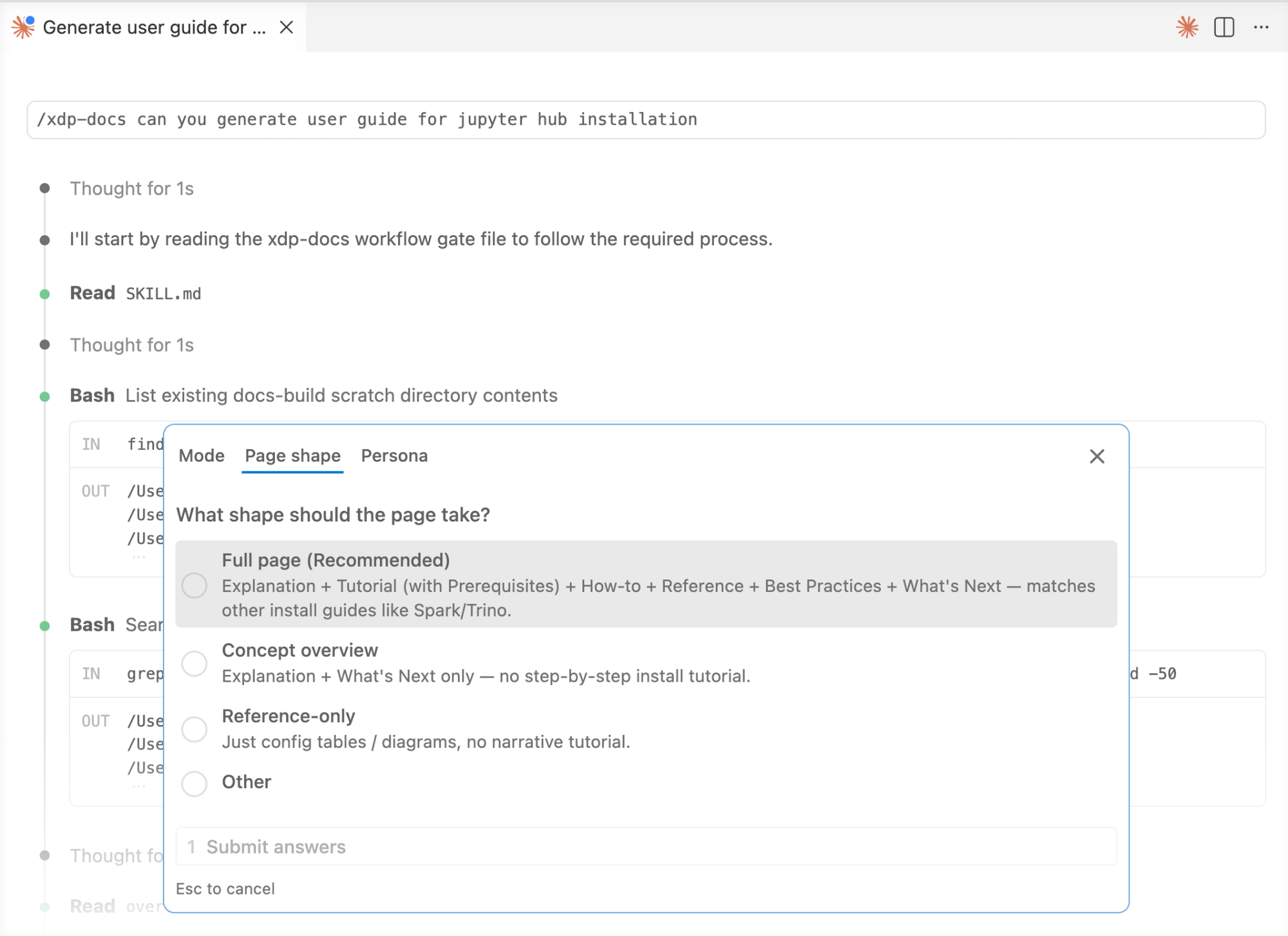
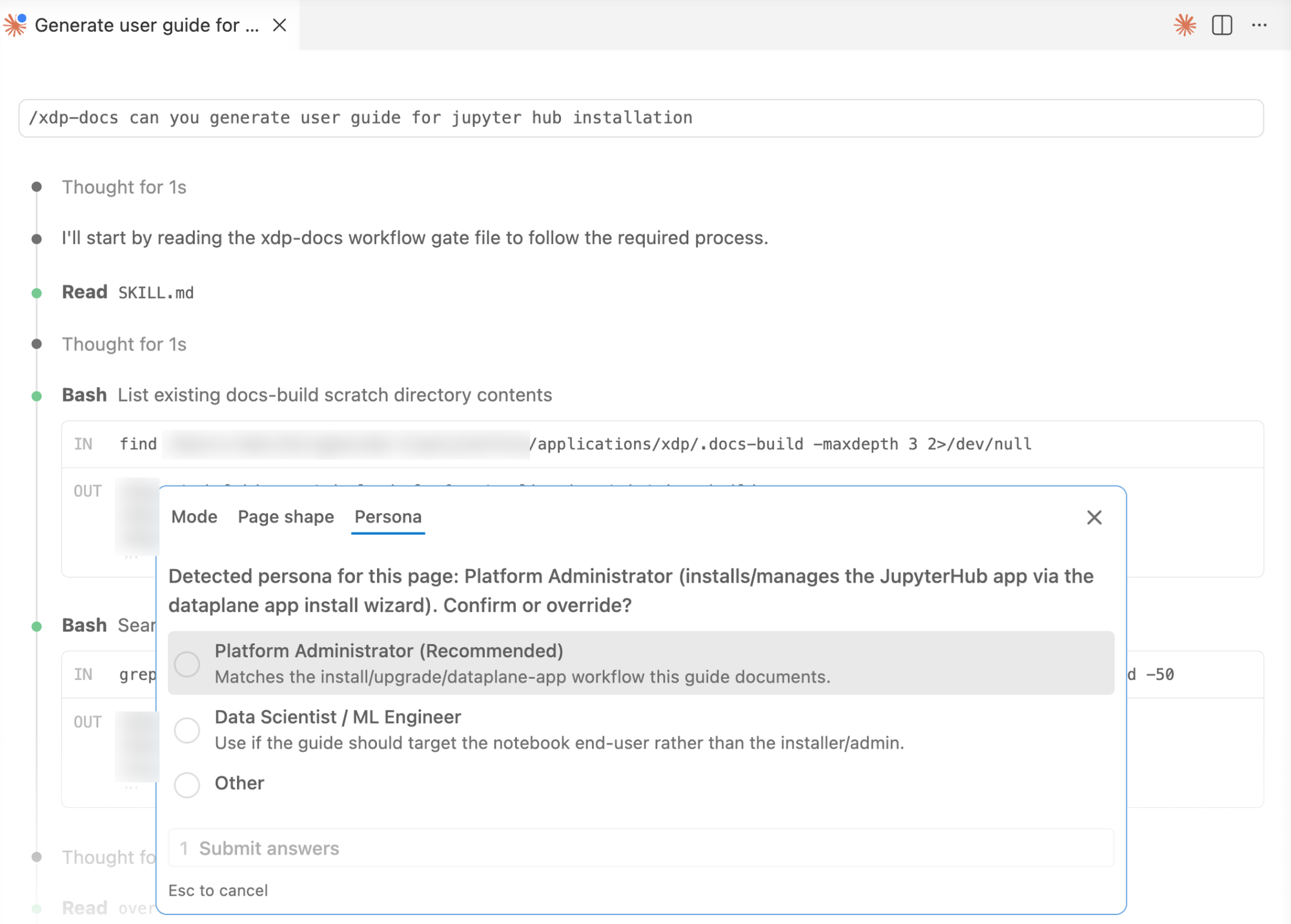
Alongside the mode, it also works out who the guide is for and confirms it with you. Take a look at the screenshots below, where the Jupyter Hub installation guide was generated based on the user-chosen mode, page shape, and persona:
How it Gets Accurate Context (And Why the Notes are Markdown Files)
A guide is only as good as what the assistant knows. Its knowledge comes from two places:
The live product: screenshots tell it what the product looks like and does.
Curated notes in the codebase: these tell it why a feature exists and how it really works.
Those notes are plain Markdown (.md) files kept in the code repository, in an architecture/ folder: one top-level map (README.md) plus one file per topic area (compute, storage, security, and so on). Crucially, the assistant does not read the whole repository. It follows a short, curated path:
| Step | What it reads | Why |
|---|---|---|
| 1 | architecture/README.md — the map / index |
Get oriented: what exists and where |
| 2 | The one area file that matches the topic (found via a topic → document table) | Load only the relevant facts, not everything |
| 3 | A specific module's README, if exact detail is needed |
Fill in precise names, options, and behaviour |
Because a topic → document table points straight to the correct file, the assistant loads a small amount of high-value context instead of scanning the entire codebase. That makes it faster, cheaper, and more accurate, and it keeps it from inventing things.
This is also where documentation connects back to engineering: these are the same architecture/ Markdown files that the Context Driven Programming Framework creates and keeps up to date. The two efforts reinforce each other, good engineering notes make good customer documentation, automatically. A team with no such notes yet can still use Modes 1, 3, and 4 (which lean on the live product), pointing at whatever docs they do have; a good top-level README.md is enough to start.
Standards and Guidelines We Considered
Because these guides are customer-facing, we grounded the writing in existing standards rather than leaving tone and structure to chance.
| Standard / guideline | Why it's in scope? |
|---|---|
| Microsoft Writing Style Guide (MSTP) | Base style for structure, capitalization, procedures, and UI-element phrasing: the de-facto standard for technical docs. |
| Microsoft Bias-Free Communication guidelines | Baseline for avoiding stereotyping and exclusionary phrasing in examples, names, and scenarios. |
| Inclusive- and bias-free-language guidelines (industry) | Political correctness and inclusive language in tech docs. For example, gender-neutral wording, avoiding ableist or culturally loaded terms, neutral placeholder names/data. |
| Company style guide | Product naming, tone of voice, terminology, and brand rules take precedence where they differ from MSTP. |
Beyond these standards, we also weighed a few practical concerns:
- Plain language & reading level: short sentences, active voice, present tense, second person ("you"), for a global/non-native-English audience.
- Accessibility: meaningful alt text on every screenshot, logical heading order, no "click here" links, no meaning conveyed by colour alone (toward WCAG).
- Terminology consistency: one term per concept, backed by a glossary/controlled vocabulary, so the AI doesn't drift between synonyms.
- Privacy & safety in media: no real credentials, PII, or customer data in screenshots and examples; redact before publishing.
- Localization-readiness: avoid idioms, region-specific date/number formats, and text baked into images that can't be translated.
When these guidelines conflict, we follow a set precedence order: company style guide → MSTP → general inclusive-language guidance.
Why It Opens a Real Browser
To write an accurate tutorial, the assistant looks at the real, running product rather than relying on code alone, for a few plain reasons:
- It documents what you actually see. Screenshots of the live product are the source of truth, so the guide matches reality instead of guessing from code.
- It can navigate like a person. The browser plug-in hands the assistant a text "map" of each screen, so it can reliably find and click the right buttons, step by step.
- It logs in once. It remembers your login between runs, so you don't re-authenticate every time.
- It works everywhere. The same setup runs in both Cursor and Claude Code, on Mac, Linux, or Windows.
An Example Flow: Documenting a Banking App's "Add a Payee" Flow
Consider that a completely different team owns an online-banking app and wants a guide showing customers how to add a new payee (a person or business they can send money to). With this tool set up in their repo, one person would:
1. Ask: In Cursor/Claude Code they type: "/bank-docs write a guide for the Add a Payee flow."
2. Choose a mode: The assistant asks; they pick "Walk the live app."
3. Watch it explore: The assistant opens the banking app, logs in, goes to Payments → Add a Payee, fills in a sample payee (name, sort code, account number), and screenshots each step.
4. It fills in the facts: It reads the app's own Markdown notes/README so the guide explains why each field matters, for example, why a new payee must be verified before the first transfer, not just what the button says.
5. It writes a draft: A tidy guide appears as a Markdown file: an overview, a step-by-step tutorial with the screenshots, architecture, and a reference table of the payee fields and transfer limits.
6. A person reviews and publishes: They read it, fix anything, and run one command to publish it to their docs website.
Nothing in those steps is specific to xDP or to banking: swap the banking app for a supply-chain tracker, an order-management system, or any web product with a codebase, and it works the same way.
Best Practices and Common Pitfalls
| Do | Avoid |
|---|---|
| Let it read your Markdown product notes, not just screenshots: that's where the "why" comes from | Describing screens mechanically ("the header has a button…") |
| Decide who the reader is and write for them | Writing for a vague "everyone" |
| Always have a person review before publishing | Letting anything go live automatically |
| Reuse screenshots you already captured (Mode 4) | Re-driving the whole product for a tiny change |
Implementation Overview
The logic lives at applications/<foldername>/<folder-studio>/xdp-docs/ and is activated by the /xdp-docs command (installed into .cursor/commands/ and .claude/commands/ by XDP Studio's setup), it is not a registered skill:
| Piece | What it holds |
|---|---|
commands/xdp-docs.md |
The thin /xdp-docs entry point that loads the logic |
SKILL.md |
The main instructions: the four modes and the workflow |
prompts/ |
The writing style guide, page template, and reader personas |
scripts/ |
The publisher (sends the finished guide to the docs website) and the diagram renderer |
reference.md, setup.md, install.sh |
Detailed how-to (including the topic → document map) and one-command setup: install.sh takes --cursor / --claude to wire up just the tool you use |
Global publication is always kept intentionally separate, using a deliberate command that a person runs: draft first, then live. The assistant never publishes on its own.
From Tool to Platform
We are closing in on two exciting enhancements that would turn the tool from a single-product helper into a reusable platform.
The first is multi-tenancy, along two axes: multiple products and multiple users.
Today, one installation serves one product, driven by one shared config and pointed at one docs destination. Making the product, its app, login, docs-site target, personas, and knowledge-base location, a per-tenant setting would let the same tool document many products side by side without forking. Making the user a first-class dimension would let many people work through the same installation at once, each with their own credentials, their own drafts kept separate, their own permissions over what they can generate and publish, and their own audit trail, so that work is isolated and attributable rather than pooled under one shared account. Together, these changes would mean any authorised user could document any product they have access to, from a single deployment.
The second is a persistent knowledge base.
Now, every generated guide and its screenshots are discarded after publishing, and the curated source notes that make the writing accurate live only in one repository. Storing both the source notes and the finished guides in a searchable knowledge base would let the assistant reuse and cross-reference what it has already written: retrieving the closest existing guide before drafting a new one, keeping terminology consistent across pages, and letting a person search what has already been documented.
Together, these two changes would make the tool multi-product and multi-user, and make each run smarter than the last instead of starting from a blank page.
Take a look at how Docs Agent works in the video below:
How Docs Agent Works.
Significance of the Tool
What makes Docs Agent different isn't that it writes documentation, it's that it does so under the same constraints a real writer would work under: read the product, read the code, know the reader, follow the style guide, and never publish without a human sign-off. That combination is what turns "AI writes docs" from a demo into something a team can actually run in production. The two pieces still missing, multi-tenancy and a persistent knowledge base, are what would take it from a tool one team runs on one product to infrastructure an entire org could run on everything it ships.
None of this answers the question every documentation team will eventually ask: Do we intend to replace the tech docs team at some point, or are we aiming to innovate more using the extra bandwidth we just created? That's a decision each organisation has to make for itself, and this blog is meant to give you the technical grounding to make it deliberately rather than by default. For our part, we believe in our people, and we believe that the bandwidth this creates is better spent on the innovations only they can do: judgment, depth, and the kind of thinking that doesn't automate.
If you're into detailed engineering write-ups, real system-design decisions, and lessons drawn straight from teams operating large-scale distributed systems, follow engineering.acceldata.io, new posts land in your inbox every week.